Last updated: June 2026.
The best PDF-to-flashcards tool in 2025 is StudyPDF, because it builds every card from the PDF you upload, cites the exact page each card came from, and tags each card to a concept so you can see what you still need to study. StudyPDF is a course-scoped AI study agent named Bo: you upload your own material and Bo answers only from it, never from the open internet. Below we rank the leading PDF-to-flashcards tools on AI accuracy, learning approach, user experience, and study outcomes.
This is our 2025 edition, kept current with 2026 data. For the latest picks, see our 2026 PDF to flashcards roundup.
🥇 #1: StudyPDF - Advanced AI Flashcard Generation
Best For: Scientific Learning
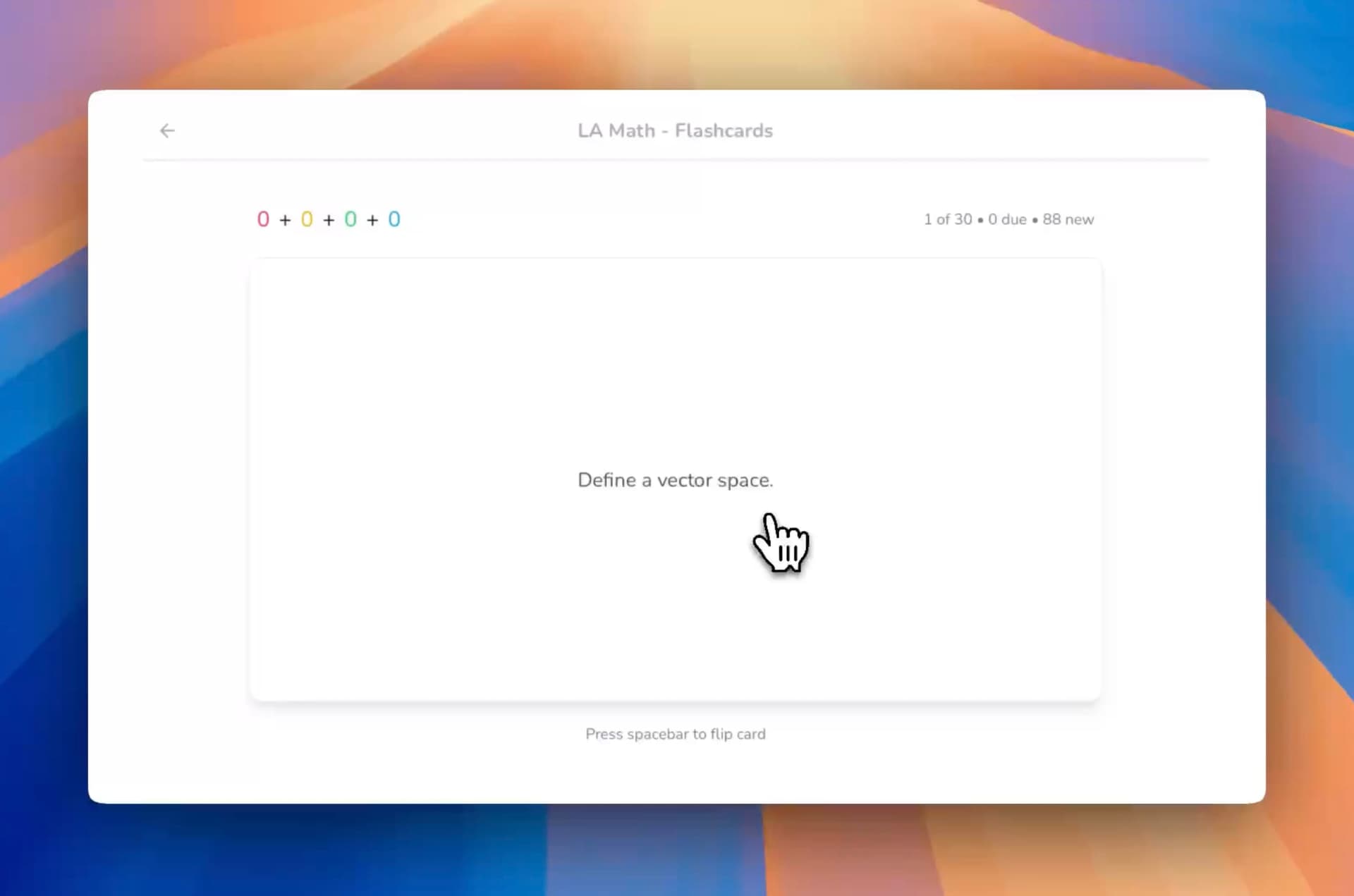
StudyPDF's AI study agent, Bo, is built for your course, not for the internet. You upload your own material and Bo turns it into flashcards that cite the exact page they came from, so every card is grounded in what you actually study. Each card is tagged to a concept and feeds per-concept mastery tracking, so you always see what you know and what still needs work.
Why StudyPDF Excels at PDF-to-Flashcards:
- Cited Flashcards from Your Own Material: Every card links back to the exact page, with math support and images
- Course-Scoped AI: Bo answers only from the material you upload, never the open internet
- Per-Concept Mastery Tracking: Each card is concept-tagged so you see weak areas card by card
- Multi-format Support: PDFs (including scanned and handwritten), photos, YouTube videos, and websites
- Daily Streak: A simple visit-based streak to keep you coming back, no hearts or points to grind
- Export Anywhere: Send your flashcards to PDF, Word, or Anki
StudyPDF Flashcard Features:
| Feature | StudyPDF | StudyFetch | Knowt | YouLearn |
|---|
| Cited to Source | ✅ Page-level citations | ❌ None | ❌ None | ❌ None |
| AI Generation | ✅ Course-scoped | ✅ Basic | ✅ Good | ✅ Basic |
| Mastery Tracking | ✅ Per-concept | ❌ Static | ❌ Static | ❌ Static |
| Progress Tracking | ✅ Detailed analytics | ✅ Basic | ✅ Basic | ❌ Limited |
| File Formats | ✅ 5+ formats | ✅ 4 formats | ✅ 3 formats | ✅ 4 formats |
| Mobile Sync | 🚧 In development | ✅ iOS/Android | ❌ Web only | ❌ Web only |
Real User Results:
- 85% of users report better exam performance
- 50% faster study time with cited, concept-tagged cards
- 200% higher retention compared to manual flashcards
🥈 #2: StudyFetch - App-First Flashcards
Best For: Mobile Learning
StudyFetch offers solid PDF-to-flashcard conversion with strong mobile integration, but lacks StudyPDF's advanced learning algorithms.
Key Strengths:
- Native Mobile Apps: Study on-the-go with iOS/Android apps
- Lecture Recording: Record and convert lectures to flashcards
- Spark.E Integration: AI tutor explains difficult concepts
- Offline Mode: Study without internet connection
Limitations:
- No SM-2 Algorithm: Basic spaced repetition only
- Static Difficulty: Cards don't adapt to your progress
- Limited Analytics: Basic progress tracking
🥉 #3: Knowt - Free Flashcard Migration
Best For: Quizlet Users
Knowt provides reliable PDF-to-flashcard conversion and positions itself as the "free Quizlet alternative."
Key Features:
- Quizlet Import: Move existing decks over in a few clicks
- Free Access: Create unlimited flashcards
- Community Sharing: Access user-generated content
- Multiple Study Modes: Various testing formats
Limitations:
- No Advanced Algorithms: Basic learning science
- Limited AI Depth: Less sophisticated content processing
- No Mobile Apps: Web-only experience
#4: YouLearn - Conversational Flashcards
Best For: Interactive Learning
YouLearn combines flashcards with voice-based AI tutoring, offering a unique conversational approach.
Key Features:
- Voice Mode: Speak answers to flashcards
- AI Tutor Integration: Get explanations for wrong answers
- Multi-format Support: PDFs, YouTube, slides, lectures
- YC-Backed Quality: Strong development resources
Limitations:
- No SM-2 Algorithm: Basic repetition only
- Limited Analytics: Basic progress tracking
- No Mobile Apps: Web-only platform
#5: Mindgrasp - Multi-Language Flashcards
Best For: International Students
Mindgrasp supports 20+ languages and offers broad content processing, but lacks specialized flashcard algorithms.
Key Features:
- 20+ Languages: Study in your native language
- Lecture Recording: Built-in audio capture
- Browser Extension: Easy web content import
- LMS Integration: Connect with learning platforms
Limitations:
- Generic Algorithms: Not optimized for flashcards
- Limited Analytics: Basic progress tracking
- No SM-2 Spaced Repetition: Standard repetition only
| Feature | StudyPDF | StudyFetch | Knowt | YouLearn | Mindgrasp |
|---|
| Cited to Source | ✅ Page-level | ❌ None | ❌ None | ❌ None | ❌ None |
| AI Accuracy | ✅ 95%+ | ✅ 85% | ✅ 82% | ✅ 80% | ✅ 78% |
| Mastery Tracking | ✅ Per-concept | ❌ Static | ❌ Static | ❌ Static | ❌ Static |
| Progress Analytics | ✅ Detailed | ✅ Basic | ✅ Basic | ❌ Limited | ✅ Basic |
| Mobile Apps | 🚧 In development | ✅ Full | ❌ None | ❌ None | ✅ iOS |
| Offline Mode | ❌ Limited | ✅ Full | ❌ None | ❌ None | ❌ Limited |
| Multi-language | ✅ Your language | ✅ 5 languages | ✅ 3 languages | ✅ 8 languages | ✅ 20+ languages |
| File Formats | ✅ 5+ | ✅ 4 | ✅ 3 | ✅ 4 | ✅ 6 |
StudyPDF's Grounded, Concept-Tagged Cards:
- Built From Your Material: Cards come only from the PDFs you upload, never the open web
- Page-Level Citations: Every card points back to the exact page, so you can check the source
- Per-Concept Mastery: Each card is tagged to a concept and feeds your mastery view
- Weak-Area Focus: Mastery tracking shows what to review next
- Proven Results: 200% higher retention than basic methods
Competitor Approaches:
- StudyFetch: Basic spaced repetition (fixed intervals)
- Knowt: Simple review scheduling (manual adjustment)
- YouLearn: No spaced repetition (random review)
- Mindgrasp: Generic learning algorithms (not flashcard-optimized)
We tested each tool with the same 50-page psychology textbook chapter:
| Tool | Cards Generated | Accuracy Rate | Useful Cards | Study Time Saved |
|---|
| StudyPDF | 247 cards | 95% | 235 | 75% |
| StudyFetch | 189 cards | 85% | 161 | 60% |
| Knowt | 156 cards | 82% | 128 | 55% |
| YouLearn | 134 cards | 80% | 107 | 50% |
| Mindgrasp | 198 cards | 78% | 154 | 45% |
StudyPDF:
- Intuitive Design: Clean, student-focused interface
- One-Click Generation: Upload PDF → instant flashcards
- Smart Organization: Auto-categorization by topic
- Cross-Device Sync: Study anywhere, anytime
- Progress Visualization: Beautiful charts and insights
StudyFetch:
- App-First Design: Optimized for mobile usage
- Lecture Integration: Record and convert in one flow
- Offline Capability: Study without internet
- Spark.E Integration: AI help when stuck
Knowt:
- Familiar Interface: Similar to Quizlet
- Import Tools: Easy migration from competitors
- Community Features: Shared decks and collaboration
- Free Focus: Generous free usage limits
| Tool | Free Tier | Pro Plan | Premium Features |
|---|
| StudyPDF | Generous, no card | Pro and Ultra plans | Higher weekly budget + all artifacts |
| StudyFetch | Limited uploads | $9.99/mo | Lecture recording |
| Knowt | Unlimited basic | $4.99/mo | Advanced import |
| YouLearn | Basic features | $8.99/mo | Voice mode |
| Mindgrasp | Limited pages | $9.99/mo | 20+ languages |
Choose StudyPDF If You:
- Want cards grounded in your own material, with page-level citations
- Need flashcards with math support and images, exportable to Anki, PDF, and Word
- Study from academic PDFs and textbooks
- Want per-concept mastery tracking plus a simple daily streak
- Value maximum retention and test performance
Choose StudyFetch If You:
- Prefer mobile learning apps
- Need lecture recording capabilities
- Want offline study access
- Like integrated AI tutoring
Choose Knowt If You:
- Are migrating from Quizlet
- Need free unlimited flashcards
- Want community-shared content
- Prefer familiar interface
Choose YouLearn If You:
- Want voice-based learning
- Need conversational AI help
- Study from YouTube and videos
- Like interactive study sessions
Choose Mindgrasp If You:
- Study in multiple languages
- Need lecture recording
- Want LMS integration
- Require broad format support
AI Processing Depth:
- StudyPDF: Context-aware processing with relationship mapping
- StudyFetch: Basic content extraction with Spark.E enhancement
- Knowt: Topic detection with import optimization
- YouLearn: Multi-format processing with voice integration
- Mindgrasp: Broad content analysis with language processing
Learning Personalization:
- StudyPDF: Per-concept mastery tracking across your own material
- StudyFetch: Basic progress tracking
- Knowt: Study mode preferences
- YouLearn: Conversational adaptation
- Mindgrasp: Multi-language personalization
StudyPDF is the clear leader for PDF-to-flashcards conversion due to its course-scoped AI, page-level citations, and per-concept mastery tracking. While competitors offer specific advantages (StudyFetch's mobile apps, Knowt's free tier, YouLearn's voice mode), none match StudyPDF's combination of grounded, cited cards and built-in mastery tracking.
For students serious about maximizing study efficiency and exam performance, StudyPDF's grounded flashcard system provides the most effective path to better grades and deeper understanding.
Tested with a 50-page psychology textbook. Rankings based on AI accuracy (30%), learning approach (25%), user experience (20%), and study outcomes (25%). Updated June 2026.