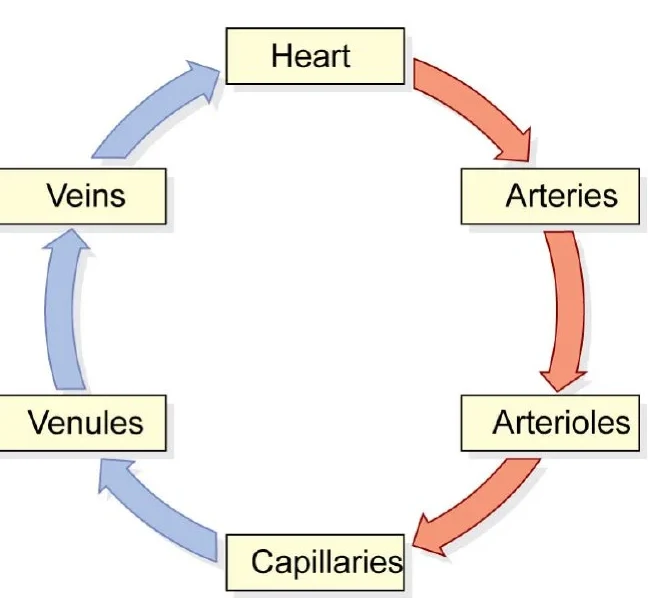
Bo pulls the labeled diagrams out of your own slides, scans, and photos, then masks them. Not one image you paste, your entire course.
AI Image Occlusion
Image occlusion, without drawing a single box.
Bo masks every label on your own lecture diagrams, then exports to Anki's native Image Occlusion. No drawing boxes by hand.
Built only from your own course.

Make image occlusion from my circulation lecture.
How Bo makes it.
01
Upload the lecture
Slides, a scanned atlas, a photo of a page. Bo pulls out the labeled diagrams.
02
Bo masks every label
Every printed label, boxed automatically. One card per diagram.
03
Study it, or send it to Anki
Recall in-app, or export to Anki's native Image Occlusion and a print-ready PDF.
Study it
Quiz the diagram, not a copy of it.
Cover everything and recall the whole picture, or reveal one label at a time.
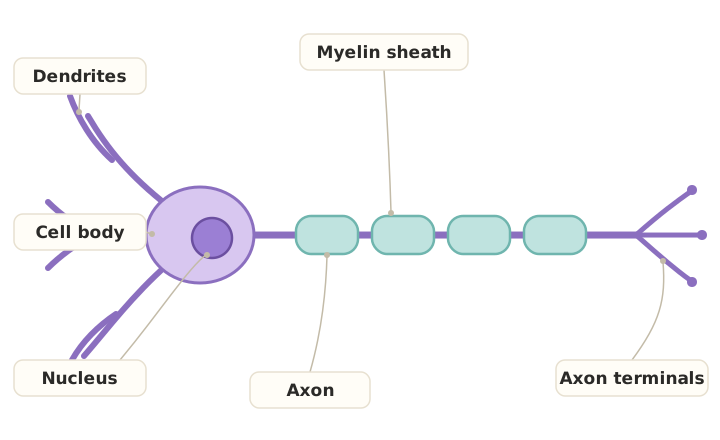
0/6 revealed
See Bo in action.
A quick look at how Bo turns your own lectures into study material.
It leaves the app clean.
Native Anki Image Occlusion
Export to Anki's built-in Image Occlusion note type. Cards open in Anki's own editor with no add-on, one editable note per diagram.
Print-ready PDF
Every diagram as a clean worksheet. Hide-all to quiz yourself, then check against the answer sheet.
Cover, don't reread
Reading the label isn't recall. Covering it is.
It remembers
It tracks the labels you keep missing.
Every diagram you study feeds your course mastery, so Bo knows which labels you keep blanking on and brings them back sooner.
0%
- Vessel sequence, aorta to vena cavaDrilling
- Capillary exchangeSolid
- Arterial vs venous wallsStrong
Why Bo
Occlusion from your own lectures
Cards export to Anki's built-in Image Occlusion note type, editable in Anki itself. Nothing trapped in our app, nothing to break on an update.
The same lecture also becomes flashcards, quizzes, exams, and a study guide, all tagged to the concepts they test.
What you get
Everything, from your own course.
- Labels detected and masked automatically, no drawing boxes by hand
- One clean card per diagram, in the order you choose
- Hide-all or reveal one at a time, your call per session
- Drag-and-resize box editor for when a mask needs nudging
- Native Anki Image Occlusion export (.apkg), editable in Anki's own editor, no add-on
- Print-ready PDF of every diagram
- Each card tagged to the concept it tests, feeding your mastery
- Built on your course's real diagrams, in your language
One Bo. Every study tool.

Free to start
Start studying.
Upload your course and ask Bo anything. No card required.
FAQ
Questions, answered.
No. That is the whole point. Bo detects every printed label on the diagram and masks it for you. If a box needs nudging there is a drag-and-resize editor, but you start from a finished deck, not a blank canvas.
Yes, to Anki's built-in Image Occlusion note type, so the cards open in Anki's own image-occlusion editor with no add-on. One editable note per diagram, and Anki generates a card per label.
Anything with printed labels: anatomy, histology, cell and plant biology, neuroanatomy, labeled processes and cycles, maps. If the diagram has callout labels, Bo can occlude them.
Your own uploads. Bo crops the figures out of your slides or scans during processing. Nothing is generated or pulled from the internet.
Yes. Pick the lectures or topics to pull from, and Bo offers up to however many labeled diagrams those actually contain. Choose fewer if you only want the high-yield ones.